Below, you will also find a video showing just how many journals and newspapers agree that this source is of value:
Friday, March 23, 2012
Engaging Students and Enhancing Learning Through Free Technology
Here is a very helpful link I found for educators to taken advantage of... and it's free! This e-book contains step-by-step instructions on how to construct a blogging website, twitter account, author a YouTube video, all while making the activity educational. I will most definitely try to take full advantage of this gem during my student teaching next semester, and during my teaching career in the future.
Below, you will also find a video showing just how many journals and newspapers agree that this source is of value:
Below, you will also find a video showing just how many journals and newspapers agree that this source is of value:

Wednesday, March 21, 2012
Interactivity 4: Teaching Math Using Technology with Purpose
I chose this particular lesson plan because it incorporated many student-centered learning strategies. From past experiences as well as formal interviews conducted with current students, I believe student-centered learning is much more effective than teacher-centered learning. Being that this was a review lesson, it was the perfect setting for student-centered learning, since the students should be familiar with the material. It gives the students a chance, then, to think critically when being presented with a more interactive lesson.
I believe that the lesson met the goals set forth at the beginning of the lesson plan. If possible, however, I would use a SmartBoard instead of an overhead projector, because the SmartBoard allows for student interactivity much more than a blackboard or overhead projector, by way of programs such as Geometer’s Sketchpad. Before sharing their findings with the whole class, I would allow for the students to talk to one another in small groups. By first working in small groups, students can become more confident in their answer, and would be more inclined to want to share their findings with the whole class. Since students often feel more comfortable asking their peers questions about a concept they did not grasp rather than asking the teacher, this could serve as an opportunity for peer teaching to occur in the classroom.
The SmartBoard as well as the program Geometer’s Sketchpad were essential as far as showing the students how the movement of one point of a triangle can change its classification. It allowed for students to ask critical thinking questions and make assumptions about the different types of triangles that would be formed based on the orientation of the point being moved. The blackboard/SmartBoard/overhead also were necessary for students to take accurate notes when going over the proofs.
Links:
Spreadsheet
Lesson Plan
I believe that the lesson met the goals set forth at the beginning of the lesson plan. If possible, however, I would use a SmartBoard instead of an overhead projector, because the SmartBoard allows for student interactivity much more than a blackboard or overhead projector, by way of programs such as Geometer’s Sketchpad. Before sharing their findings with the whole class, I would allow for the students to talk to one another in small groups. By first working in small groups, students can become more confident in their answer, and would be more inclined to want to share their findings with the whole class. Since students often feel more comfortable asking their peers questions about a concept they did not grasp rather than asking the teacher, this could serve as an opportunity for peer teaching to occur in the classroom.
The SmartBoard as well as the program Geometer’s Sketchpad were essential as far as showing the students how the movement of one point of a triangle can change its classification. It allowed for students to ask critical thinking questions and make assumptions about the different types of triangles that would be formed based on the orientation of the point being moved. The blackboard/SmartBoard/overhead also were necessary for students to take accurate notes when going over the proofs.
Links:
Spreadsheet
Lesson Plan
Friday, March 9, 2012
Let's Tweet About Something Educational For A Change...
At Roosevelt High School in Mineeapolis, Minnesota, students are being engaged in the classroom in a new way: Twitter. This video I found on YouTube shows just how engaging the activities in this particular english class can be.
I wonder how we could incorporate something as engaging into a more rigid curriculum such as Mathematics... any ideas?
I wonder how we could incorporate something as engaging into a more rigid curriculum such as Mathematics... any ideas?
Thursday, March 8, 2012
Math Is Fun! Let me show you..
There are many fun, yet educational games out there for teachers to use. In one class this semester, we played a game called Math vs. Cockroaches, which can easily be turned into a review lesson on the slope-intercept form.
The game eliminates some Math anxiety by putting a mathematics concept in the form of a video game. I really enjoy this idea, as well as the educational purposes of it.
Tuesday, February 28, 2012
Interactivity 3: Generating Technology Inventory for Mathematics
This group assignment was different than any other
I've ever done for a class at Montclair State University thus far. Although I
did see 3 of my 4 group members in classes we share, this assignment was completed
using only online communication. Like most group assignments, it required for
someone to take initiative and start planning. I decided to not wait and sent
out a mass e-mail to my group members, explaining what I thought needed to be
done and by when, so that everyone was on the same page. After most of the
group members inputted their technologies, I came up with the idea of
color-coding the different categories, and lastly, organized them by grouping
the colors together. We communicated via e-mail about any questions or concerns
we had about the assignment, and kept each other in the loop on almost a daily
basis on changes we made to the spreadsheet.
While this assignment seemed
to have gone pretty smoothly, its efficiency had a lot to do with the fact that
all of my group members held their own and completed their portion of the
assignment by the deadline. We agreed to set the deadline to Monday night, so
that all of us had enough time to write our Blogger entry before the Wednesday
deadline.
I also really liked that we
could view when changes to the document were made, and by which of the group
member(s). It created a sense of accountability for each and every group
member, wiping out any opportunities for any of the group members to “coast”
their way through the project. All in all, this group assignment surprisingly turned
out to be a very positive experience.
Thursday, February 16, 2012
"Why Are We Learning This?"
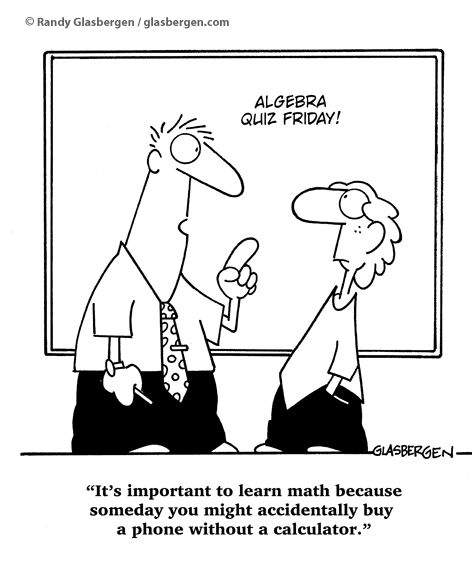
Photo credit: http://www.glasbergen.com/math-cartoons/
I thought this cartoon was a good way to sum up the fact that the way teachers sometimes believe students need to learn the material because they just need to learn it, no questions asked is very different from the way that students perceive school and learning.
Wednesday, February 15, 2012
Interactivity 2

"One machine can do the work of fifty men. No machine can do the work of one extraordinary man."
Picture credit:
Wade, Cindy. "Internet Puts Homeschoolers on Even Keel with Public School Monopoly." Web log post. Guerilla Homeschooling: Unschooling the Child and Deschooling Your Mind! Blogspot, Feb. 2012. Web. 14 Feb. 2012. <http://guerrillahomeschooling.blogspot.com/>.
Subscribe to:
Posts (Atom)